Signer Verification
Can Anyone With a Peekop Link Sign?
No. A Peekop link alone is not signing authority.
Only the designated signer who completes exact recipient email verification receives Verified Access and can enter the protected signing session.
Product Evidence
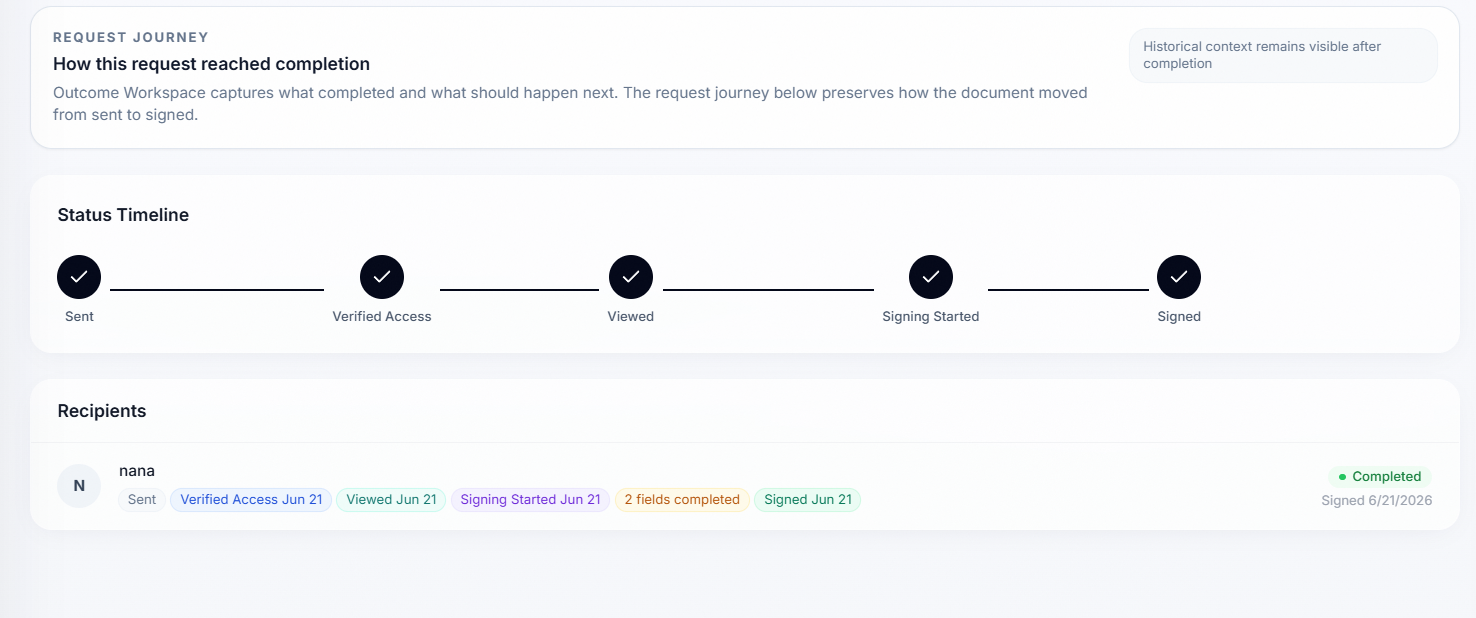
Verified Access appears before viewed, Signing Started, and signed
Common Assumption
Forwarded link does not equal signing authority
Many people assume that if someone forwards a signing link, the new person can sign. That is not how Peekop's protected signing flow works.
What a link actually provides
A signing link provides access to the signing request. It does not automatically grant authority to perform protected signing actions.
In Peekop's model, a Recipient-Specific Link is the beginning of the flow, not the end of the trust decision.
- It does not automatically grant access to protected document content.
- It does not automatically grant access to PDF artifacts.
- It does not automatically grant permission to submit progress.
- It does not automatically grant permission to sign.
- It does not automatically grant permission to decline.
Those actions are protected behind Verified Access and a Protected Signing Session.
What Happens Next
Recipient-Specific Link
A Peekop signing request starts with a recipient-specific link created for the intended signer.
Exact Recipient Email Verification
Before protected document actions can continue, the recipient confirms the exact email associated with that request.
Verified Access
After verification succeeds, access is treated as trusted recipient access for that request.
Protected Signing Session
Signing actions occur inside a protected signing session rather than through unrestricted public-link access.
Signing Actions and Completion Record
After Verified Access is established and the protected signing session begins, Peekop can preserve signing actions, Signing Started, and the Completion Record.
What if a link is forwarded?
Forwarding a link does not automatically grant signing authority.
A forwarded user would still need to satisfy recipient verification requirements before protected signing actions can occur.
That is the core difference between link possession and signing authority.
Link possession vs signing authority
| Concept | What it means |
|---|---|
| Link Possession | Can reach the signing request. |
| Signing Authority | Requires recipient verification and protected session access before protected signing actions can occur. |
What gets recorded
After Verified Access is established, Peekop can preserve evidence that supports what happened throughout the signing journey.
- Verified Access
- Signing Started
- Completion timing
- Completion evidence
- Completion Record
Audit metadata supports the evidence trail after verification. It is not the primary explanation of signing authority on its own.
Frequently asked questions
Can anyone with a Peekop link sign?
No. A Peekop link alone is not signing authority. Only the designated signer who completes exact recipient email verification receives Verified Access and can enter the protected signing session.
What happens if a link is forwarded?
Forwarding a link does not automatically grant signing authority. A forwarded user would still need to complete exact recipient email verification before protected signing actions can occur.
Does Peekop require email verification?
Yes. Peekop requires exact recipient email verification before Verified Access is granted and protected signing actions are allowed.
Is a Peekop link a public signing link?
No. Peekop uses recipient-specific signing links and Verified Access rather than unrestricted link-based access.
Why does Peekop not require accounts?
Peekop removes the friction of forced recipient account creation, but it still uses recipient verification before protected signing actions begin.
What is Verified Access?
Verified Access is the trusted access state reached after the intended recipient completes the required verification step for that signing request.
What is a protected signing session?
A protected signing session is the signing environment entered after Verified Access is established and before protected signing actions occur.
What evidence exists after signing?
Peekop can preserve Verified Access, Signing Started, completion timing, completion evidence, and the Completion Record after signing is complete.